Showing posts with label Software. Show all posts

Sunday, May 15, 2016

You’ll see an updated icon and app design for Instagram

 You’ll see an updated icon and app design for Instagram
instagramToday we’re introducing a new look. You’ll see an updated icon and app design for Instagram.
 Inspired by the previous app icon, the new one represents a simpler camera and the rainbow lives on in gradient form.
 You’ll also see updated icons for our other creative apps: Layout, Boomerang and Hyperlapse.
We’ve made improvements to how the Instagram app looks on the inside as well. The simpler design puts more focus on your photos and videos without changing how you navigate the app.
The Instagram community has evolved over the past five years from a place to share filtered photos to so much more — a global community of interests sharing more than 80 million photos and videos every day.
 Our updated look reflects how vibrant and diverse your storytelling has become.
Thank you for giving this community its life and color. You make Instagram a place to discover the wonder in the world.
 Every photo and video — from the littlest things to the most epic — opens a window for people to broaden their experiences and connect in new ways.

Monday, April 25, 2016

How to remove recent contacts in the Mail app for iPhone

How to remove recent contacts in the Mail app for iPhone
Do you still see your friend's old email address as a
suggested contact in the Mail app? You can get rid of that.
When sending an email, the Mail app uses autofill to suggest a contact based on the name you enter. Sometimes, outdated email addresses show up in the suggestion list, even though you've updated the person's information in your Contacts app. There is a way to remove email addresses from these autofill suggestions so you don't accidentally send something to an unused mail box. Here's how.
How to remove a contact from recents in the Mail app
If you have removed an email address from your Contacts app, but it still appears when you are sending a message, get it off the list before you accidentally use it.
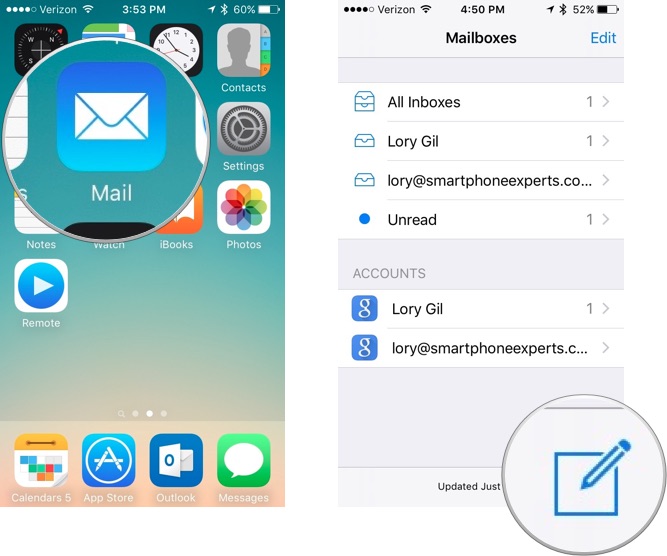
  1. Open the Mail app.
  2. Tap the Write mail icon in the bottom right corner of the screen.
    How to remove recent contacts in the Mail app for iPhone
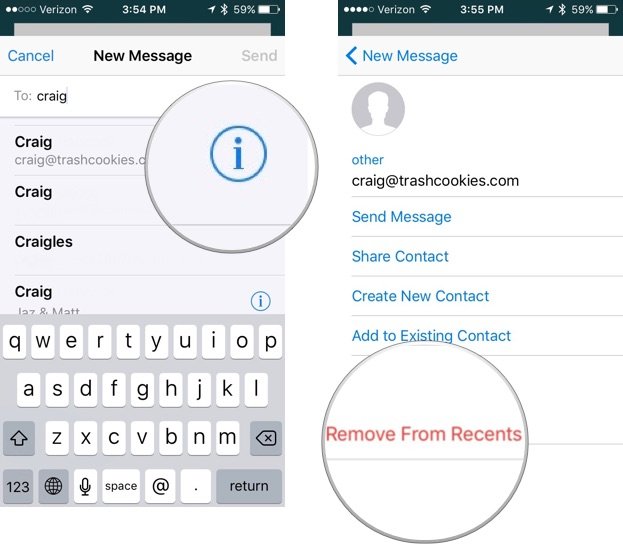
  3. Start typing a name.
  4. Find the old contact when the list of suggested emails appear.
  5. Tap the info icon next to the name.
  6. Tap Remove from Recents.
    How to remove recent contacts in the Mail app for iPhone
The contact will no longer appear as a suggested email in autofill in the Mail app.

How to update a contact with a new email address in the Mail app

If you've recently received a message from someone with a new email address, you can also quickly add it to your Contacts.
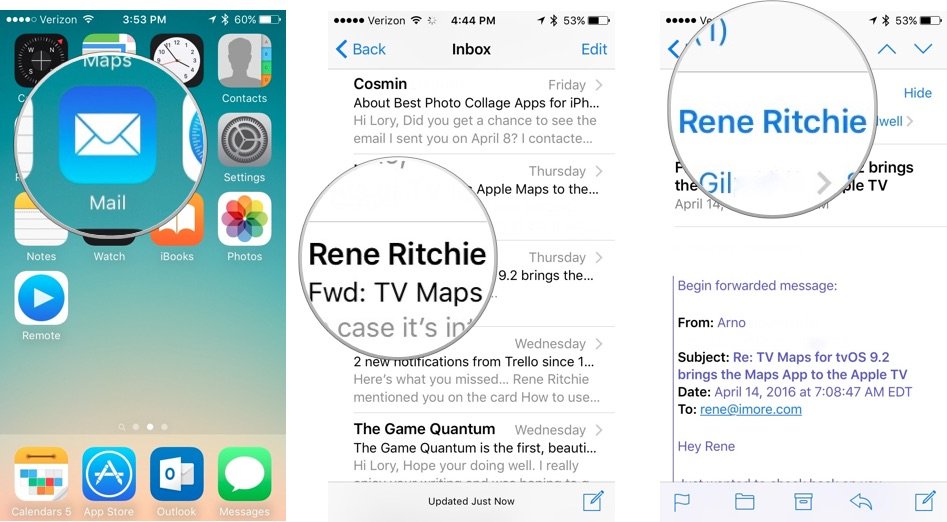
  1. Open the Mail app.
  2. Tap the email with the new contact.
  3. Tap the email address.
    How to remove recent contacts in the Mail app for iPhone
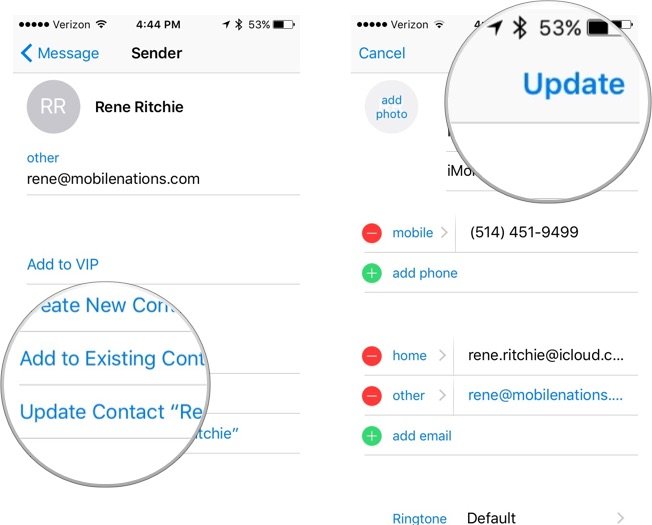
  4. Tap Add to existing contacts and select a contact.
  5. You can also tap Update Contact if it is labeled under the correct name.
  6. Tap Update in the upper right corner of the screen.
    How to remove recent contacts in the Mail app for iPhone
Once added, the new email address will show up as a suggested option in autofill in the Mail app.

Friday, April 8, 2016

Review: 12 Ways the 9.7-inch iPad Pro Is Different

If you own an Apple iPad, statistically, the odds are you own an iPad 2. There's no shame in that. Your four-year-old tablet is probably on your coffee table, or next to your bed. Maybe it's in your briefcase, full of movies for your flight tomorrow. Perhaps you're thinking about upgrading to the new 9.7-inch iPad Pro. There are many new features (and limitations) that only show up in the iPad Pro. Here's what you should know.
01
Size Matters
The most important thing an iPad does is work everywhere. The 12.9-inch iPad Pro is a terrific device, but it's most comfortable on a desk. The 7.9-inch iPad Mini is too small to do anything more than deal with email. The 9.7-inch model is the closest thing yet to a perfect middle ground: Big enough to give you space to work, small enough to hold with one hand. It's the Goldilocks iPad.
02
This Screen Is a Sight to Behold
Cool: the iPad Pro's True Tone display, which calibrates the tablet's screen so it looks right even if you're in a room with weird lighting. Cooler (technically Warmer): Night Shift, which works on any device with iOS 9.3, changes the color spectrum at night so you can use the device without hurting your eyes or disturbing your sleep. The iPad Pro's screen uses a wider color gamut, too, and is absolutely the best screen ever on an iPad.

03
Apple (Almost) Made Typing Great Again
Nearly every iPad keyboard case ever made has been cramped, clumsy, and cumbersome. Apple's own Smart Keyboard—unique to the iPad Pro—isn't perfect, because you just can't fit a full-size keyboard into so little space. But you get used to it, and at least it doesn't look awful or weigh as much as the tablet itself. The Smart Keyboard is the keyboard case you should buy.
04
Don't Call It a Stylus
The Apple Pencil is for drawing and sketching. Maybe for taking notes in a meeting. It's not for navigating, avoiding fingerprints while you play games, or typing on the on-screen keyboard. It doesn't do such things well at all. If you have no artistic intentions for your iPad Pro, you don't need to drop a Benjamin on the Pencil. If you do, you should. Also, it only works on the iPad Pro, and not iPad Air.

05
The App Store Needs a Pro Boost
There are a few truly remarkable apps in the iOS App Store for 3D modeling, drawing, city planning, and the like. But only a few. Even though the iPad Pro is powerful enough to do real work, it simply may not have the apps you need---either because Apple's made it too hard for developers to make money over time, or because there aren't yet enough professional users with professional expense accounts.
06
Multitasking Is an Overstatement
The most ADD thing you can do on the iPad Pro is have two apps running side by side, with a tiny video window overlaid in one corner. That's a massive improvement over the regular iPad's obsessive monotasking (and a use case that begs for the new device's fast processor), but still nothing like what you can do with a decent laptop or desktop. Apple would tell you it's good for focus; I say it's bad for productivity.

07
There's Desk Work And There's Plane Work
Let's say you're on vacation---a beach in Belize, say---and the boss pings you to say he needs to you to send six emails and double-check that spreadsheet, stat. The iPad Pro is perfect for these kinds of short, simple, and task-oriented tasks. It's light and portable, it lasts a long time, it'll work anywhere. But if you're already sitting at your desk, hunkering down for the workday, wouldn't you want something with more power, more screen, more flexibility?
08
Fast Keeps Getting Faster
I keep thinking the iPad is fast enough, and I'm probably right, but the Pro really is at another level. Whether you're triple-tasking, playing the increasingly impressive games available in the App Store, or editing video, you feel the difference. It used to feel like a reach to call an iPad a "desktop-class" device, but not anymore. This thing screams.

09
More Speakers Means Merrier Audio
One of the best things about both sizes of iPad Pro is the four speakers, one on each corner, that output stereo sound in any orientation. The iPad Pro is loud enough to be heard over the din of your kitchen, the running water, or your obnoxious roommate. That goes a long way toward it feeling like a tablet that can truly do everything you need, no accessories needed.

10
LTE Is the Real Must-Have Accessory
If you buy the iPad Pro, odds are good you're going to keep it for a while. Longer than your phone, probably longer than your laptop. If you can swing it, get the iPad Pro with LTE capability. Purchasing (and cancelling) cellular service is incredibly easy, and it's the kind of thing you'll want more than you think on a machine that's more capable of office tasks. If you have an LTE iPad Pro, you'll find it's suddenly useful many more places.
11
The All-in-One Work Machine Is Coming
Most of the best use cases for the iPad Pro are really heavily prescribed. You take notes here, then take a picture of your document like this, then file it here, open it in this app, send it there. But these things are going to get easier and broader, and there really is something magical about being able to—for instance—shoot, edit, and share video in the same device. Or take a picture of a document, mark it up, and send it off in a single app. This is the futur

Tuesday, January 12, 2016

Internet Explorer is dead

Internet Explorer is dead
Internet Explorer, which was first called Windows Internet Explorer, was first released as part of the add-on package Plus! for Windows 95 in 1995.
Internet Explorer was one of the most widely used web browsers, attaining a peak of about 95 per cent during 2002 and 2003.
However, it struggled in the face of competition, and in May 2012 it was announced that Google's Chrome overtook Internet Explorer as the most used browser worldwide.
The brand has struggled to shake off the bad reputation of Internet Explorer 6, which was notoriously insecure.
After Internet Explorer 6 was released in 2001, the browser hit its first real speed bump in its digital life.
An alert from the United States Computer Emergency Readiness Team warned users in 2004 that holes in Internet Explorer could lead to their passwords and other personal information falling into the hands of hackers.
Microsoft rolled out a fix but security issues continued to grow - causing the firm to eventually decide to kill off the brand.

Wednesday, October 28, 2015

Galaxy S6 edge+ gets first software update

Galaxy S6 edge+ gets first software update
The unlocked Galaxy Note 5 got its first software update last week, and Samsung is now rolling out the exact same update to the Galaxy S6 edge+. The Galaxy S6 edge+ shares all of its hardware with the Galaxy Note 5; it’s interesting to see Samsung finally maintaining consistency in software updates despite the two devices being from a different lineup, and despite the Note 5′s software not exactly being 100 percent similar to the S6 edge+ thanks to its stylus-related features.
The update brings improvements to battery usage and call stability, in addition to enhanced security. It’s a 138.14 MB update (with build number G928GDDU2AOJ5) that is available on our S6 edge+ in India, and it seems the same update has already rolled out for the European variant of the device in recent days, something that went under our radar. We will be keeping an eye on the battery life of the phone over the next few days to see if it actually improves; the S6 edge+can last considerably long out of the box, and increased endurance would certainly be very welcome.
Have you received this update on your Galaxy S6 edge+? Let us know in the comments, and if you’ve been on the latest version of the OS for a few days, do tell us if you have noticed any changes in battery life.
Update: It seems the changelog is a bit misleading. The battery menu on the S6 edge+ (and the Note 5) now has an App Optimization section that seems to be a modified version of the Smart Manager feature that allowed users to make apps stop running in the background after 10 minutes to save battery life. The device now simply says that it is optimizing an app instead of saying that the app will be force stopped, and the “Battery usage optimization” bullet point in the changelog likely means the App Optimization feature rather than actual improvements to battery life.

Monday, October 12, 2015

How tracking data improves the customer experience

by New Relic
Customer service can make or break any business; it will either help your business grow or bring it crashing down.
According to a study by the Wharton School: reducing customer attrition by five to 10 percent can increase annual profits by as much as 75 percent. Customer service not only includes a trouble-free experience, but by meeting and exceeding your customer’s needs. Customers are not all created equal and customers reward companies that deliver fast, reliable and increasingly dynamic experiences. This is why understanding your customers better is imperative to your business.
A Zendesk study says, 40 percent of customers begin purchasing from a competitor because of its reputation for great customer service. What differentiates your customers based on demographics, behaviors and profitability helps you know their habits. Not only does segmenting customers tell you how to better serve current customer demographics, it also allows you to discover any unmet needs and deliver better products and services in the future and reduces operating costs by tens of millions of dollars a year. There is an abundance of great software to collect and track metrics when measuring, managing and improving the customer experience.
CRM software provides data that helps you analyze things such as average call duration, peak calling periods and more. This data provides businesses with valuable insights that can help make them more effective at handling customer calls. By allowing customers to link their numbers to their accounts, customer service representatives have the customer’s name as well as purchase history ready. Knowing those things can cut down on trying to spell out names, see what the customer needs help on and, most importantly, cut down on the call’s duration.
With data like purchase history, one can see which customers are frequent shoppers. You could be proactive and send the customer a personalized email thanking them for their loyalty and offer them a personalized coupon code. You’ll also be able to easily identify which customers are your strongest advocates and are willing to serve as references or new product testers.
Having data and being able to analyze and understand that data provides your employees with training and tools in order to deliver better service. Employees with the right tools can input, update and view customer information in a database that is accessible anywhere.
Thanks to advances in cloud technology, employees can stay 
connected to customers and their data in real time – whether on a sales floor, in a warehouse, steps away from their desk, or on an airplane 35,000 feet in the air. Encouraging your staff to embrace new ways of improving customer service can boost customer loyalty and employee happiness. It also allows customers to contact you however they feel most comfortable. Whether it’s by telephone, e-mail, or by instant messaging, your customers will be able to contact you in the way they want.
Amazon is a large corporation that’s using big data from customers to better understand them and help them along the way. Amazon collects massive amounts of data about you from address, credit information, to purchase history. While thousands of companies are able to collect this sort of information, Amazon is doing something incredible with that data – using that data to build upon your relationship with the company.
By connecting your personal information and purchase history to your account, the representative is quickly able to assist you and provide an individualized experience. Beyond previous purchases, Amazon also collects this information not only to better serve you products that you might be interested in but are creating a relationship where they know who you are, what you like, and how they can help you to get back to your daily life quickly as possible. While they may want you to spend hours on their site, they don’t want it to be for the wrong reasons.
A Forrester study claims that 63 percent of people believe that the importance of customer service has risen – a differentiating area for businesses. If well over half of potential customers believe this, you have to start making steps to better your business chances against all the competitors.
Nothing can replace the value of providing great customer service, and especially in today’s interconnected economy, your business’ survival depends on how quickly you can respond to customer needs. From nudging a lingering customer on checkout pages to efficiently responding to consumer issues, tracking key customer data improves the customer experience.

Saturday, September 26, 2015

The Russian government to a seven-year malware campaign

A new report from F-Secure has found evidence that the Russian government is behind the widespread Duke malware strain, orchestrating a seven-year campaign that has targeted Chechnya, NATO and possibly as far as the State Department and White House. Titled The Dukes: Seven Years of Russian Cyberespionage, the report details the results of research dating back to 2008, connecting the dots between more than a dozen different incidents. The team behind the Duke malware waged their campaign with nine different variants, each tailored to specific systems and situations. The variants have been the subject of a number of security reports over the years, but this is the most definitive evidence yet that the Russian government has been sponsoring the attacks.
F-Secure's conclusion is based on a number of factors. A Russian-language error message was found within one part of the code base, and the group operating the programs seemed to act largely within working hours on Moscow time — suggesting the group was Russian, although not necessarily aligned with the Russian government. From there, F-Secure looked at the group's targets and apparent resources. Duke's growth suggested a steady flow of resources aimed at a string of government-related targets: embassies, parliaments, and ministries of defense. Notably, the group never targeted the Russian government. Even after security firms made their activities public, the Duke group didn't change tactics, suggesting they weren't concerned about being apprehended.
"WE BELIEVE THE MAIN BENEFACTOR... OF THEIR WORK IS A GOVERNMENT."
"Based on our establishment of the group’s primary mission, we believe the main benefactor (or benefactors) of their work is a government," the report reads. "But are the Dukes a team or a department inside a government agency? An external contractor? A criminal gang selling to the highest bidder? A group of tech-savvy patriots? We don’t know." The report also declines to conclusively name Russia as the government involved, but acknowledges that it is by far the most likely candidate: "All of the available evidence however does in our opinion suggest that the group operates on behalf of the Russian Federation. Further, we are currently unaware of any evidence disproving this theory."
Notably absent from the report is any mention of recent digital attacks on the State Department and White House computer systems. Both attacks have been loosely linked to the Duke malware family, but the sensitive nature of the compromise has made it difficult to research. F-Secure researchers say both attacks seem like likely candidates for the Duke group, but it's hard to be certain. "The US State Department and White House are both the type of organizations that we know the Dukes primarily target," said Artturi Lehtiö, a researcher at F-Secure. "Based on what has been reported in the news, we believe it is possible that the Dukes are also behind the recent compromises of the State Department and the White House."

Friday, August 7, 2015

iOS Masque Attack Weaponized: A Real World Look

We previously have described the threats of Masque Attacks against iOS in a series of blogs [2,3,4]. Up until now, these attacks had never bee seen carried out in the wild, highlighting that advanced threats were not utilizing mobile to carry out their attacks despite rapid user adoption. However, FireEye has recently uncovered 11 iOS apps within the Hacking Team’s arsenals that utilize Masque Attacks, marking the first instance of targeted iOS malware being used against non-jailbroken iOS devices.
These apps are reverse engineered and weaponized versions of popular social networking and messaging apps, including: WhatsApp, Twitter, Facebook, Facebook Messenger, WeChat, Google Chrome, Viber, Blackberry Messenger, Skype, Telegram, and VK. Unlike the normal versions of these apps, they come with an extra binary designed to exfiltrate sensitive data and communicate with a remote server. Because all the bundle identifiers are the same as the genuine apps on App Store, they can directly replace the genuine apps on iOS devices prior 8.1.3.
Note that the bundle identifiers are actually configurable by the remote attackers. So for iOS devices above 8.1.3, although the Masque Attack vulnerability has been fixed (apps with the same bundle identifiers cannot replace each other), the attackers can still use a unique bundle identifier to deploy the weaponized app. In this scheme, the attack falls back to the Enpublic attack[1].
Fig 5. shows an example of the runtime behavior of the repackaged Facebook app. Upon launching the app, three consecutive alerts are popped up asking for permission of access the Photo, Microphone, and Contacts.
As shown in Fig. 6, those malicious Masque Attack apps leverage the LC_LOAD_DYLIB command of the MachO format to inject a malicious dylib (named “_PkgSign”) into the genuine executable file. This dylib implements the core malicious logic.
Since each Masque Attack app has different internals, the dylib needs to hook different methods for data exfiltration. As listed in Table 1, the malicious dylib maps each Masque Attack app an id prefixed by “TIGI000” and a customized class for managing the malicious behaviors controlled by the remote server.
APPIDMalicious Manager Class NameBundle ID of Masque Attack App
TIGI00001
POViewConnection
com.skype.skype
TIGI00002
POViewAsynService
com.viber
TIGI00003
POViewRegistration
net.whatsapp.WhatsApp
TIGI00004
_bvbcccyytr
com.facebook.Facebook
TIGI00006
POViewDataManager
com.facebook.Messenger
TIGI00008
POViewLogger
com.google.chrome.ios
TIGI00009
VKMessageManager
com.vk.vkclient
TIGI00010
TelegramManager
ph.telegra.Telegraph
TIGI00011
BBMManager
com.blackberry.bbm1
TIGI00012
WechatManager
com.tencent.xin
TIGI00013
TwitterManager
com.atebits.Tweetie2
...
...
...
 Table 1: The mapping of handler class to the bundle id of each Masque Attack app
The injected dylib hooks 52 sensitive functions of 38 classes in the genuine executables. All of the hooked class methods correspond to key functionalities of the genuine apps. For example, hooking “[SKPConversation OnMessage:andMessageobjectid:]” to intercept messages in Whats App and “[VideoVoipCallerView OnBeginTalk:]”  to start recording a outgoing voice call in Wechat App.  
The injected dylib is acting as part of the apps executable file and can read/modify the all data in the app’s containers to gather sensitive information and send them to the remote server. The information includes:
  • Voice call recording in Skype, Wechat, etc.
  • Text message intercepting in Skype, Whats App, Facebook messenger, etc.
  • Chrome visited website history
  • Phone call
  • SMS/iMessage content
  • Precise GPS coordinate recording in background
  • Contacts information
  • Photos
Of special note, the dylib has the capability to upload data only from targeted users. It sends the IMEI to the remote server to check if the target device is of interest. The server will instruct whether to exfiltrate data or not. However, we have found logic to bypass the check if the SKIP-LICENSE key is set to 1 in the keychain. So local colludes can set this value to 1 to force data exfiltrating if they find the victim of value.
Finally, all data are reassembled in Json format and sent to the remote server.Fig. 8 shows an example of the uploaded data (actual values anonymized). The items field contains different types of data such as the chat data for the communication apps, geo location information, phone call history, etc.

Configurable via URL scheme

The remote server and malicious behaviors are configurable through URL. In each repackaged sample, we found a customized URL scheme is added to the Info.plist file. The URL schemes follow the pattern “TIGI0000X://”, which is exactly the same as APPID column listed in Table 1.
By hooking the “application:openURL:sourceApplication:annotation:” function, the malicious dylib can parse the configure data when the URL scheme is opened. The configure data is serialized in JSON format, encoded in Base64 and appended right after the customized URL scheme. The attacker can lure the targeted victims to click such URLs via SMS/Email/Web page on the device and customize targeted configurations such as the remote server.

Conclusion

From the attack tools leaked from the Hacking Team, we have now seen that advanced targeted attacks against iOS devices have begun to emerge. We encourage all iOS users to always update their devices to the latest version of iOS and pay close attention to the avenues that they download their apps.

References

A Closer Look at iOS Attacks

iOS Attack infographic Thumbnail
Click to Enlarge

Tuesday, July 28, 2015

Samsung Electronics Unveils World’s First Wireless Mobile Charging Monitor

Samsung Electronics introduced the SE370, the industry’s first monitor with an integrated wireless charging function for mobile devices. Available in 23.6 inches and 27 inches, the SE370 monitor declutters work areas by doing away with unnecessary cables and ports needed to charge mobile devices. Along with superior picture quality, enhanced visual performance and thoughtful design, the monitor seamlessly integrates advanced technologies that offer both professionals and consumers an optimal viewing and usability experience. 
Samsung’s SE370 monitor works with all mobile devices that use the leading Qi wireless charging standard, which was developed by the Wireless Power Consortium (WPC). Qi is one of the most readily-available global interface standards. 
“Technology should support, not interfere with, active lifestyles. Our customers increasingly rely on mobile devices to obtain information and interact with others; so by doing away with the clutter on their desks, we are helping them to use their mobile devices in a smarter way,” said Seok-gi Kim, Senior Vice President, Visual Display Business at Samsung Electronics. “Through the integration of wireless mobile charging technology, our innovative SE370 monitor dramatically improves efficiency, convenience and connectivity at home and at work – representing another significant milestone in our long history of industry-firsts.”
Convenient Wireless Mobile Charging 
For optimized convenience and productive multitasking, the SE370 monitor consolidates the multiple charging ports found in other displays with a circular wireless charging area integrated in the monitor’s stand. Users simply need to place their device on the stand’s charging area to initiate automatic charging, which is confirmed by an LED light. 
As a complete solution, the SE370 eliminates the hassle of having to purchase and keep separate charging kits, saving cost and improving workspace utilization. Users also can continue working while their mobile devices charge, helping them to enhance productivity and work task efficiency. 
Comfortable Viewing and Superior Picture Quality 
Designed for extended periods of screen use, Samsung’s SE370 makes the viewing experience less strenuous. The monitor’s eye-saver mode reduces the harmful effects of blue light on viewers’ eyes and associated eye strain by monitoring and optimizing picture quality to match specific environmental settings. Similarly, the monitor’s flicker-free function protects viewers’ eyes from the constant strain of flickering screens that can occur with standard monitors. 
The SE370 further ensures comfortable viewing through a high-performance Plane-to-Line-Switching (PLS) panel. The PLS panel allows users to experience universally-optimized viewing with a 178 degree wide-viewing angle, as well as excellent picture quality with vivid and clear imagery delivered through a brightness of up to 300 cd/m2.
Improved Gaming Experience 
Complementary to these embedded picture-enhancing functions, the SE370 delivers a smooth, non-distracting and immersive entertainment experience. Supported by AMD FreeSync technology, the monitor synchronizes the screen refresh rate with the frame rate of a user’s AMD graphics card to minimize input latency, as well as to reduce stutter and lag during gaming and video playback. 
Additionally, the SE370 monitor’s 4ms response time enables clear and smooth tracking of even the fastest on-screen action without motion blur or ghosting, while a unique game mode quickly activates with the touch of a button. The monitor’s game mode detects changes in scenes and instantly corrects blurry images, enhances colors and alters contrast for improved visibility. 
Energy Efficiency and Design Sophistication 
The monitor’s new Eco Saving Plus function reduces screen brightness for increased energy efficiency. In addition to two standard manual settings, an auto-setting reduces energy consumption by approximately 10 percent based on the luminescence of the screen’s black sections in auto on-screen display (OSD) mode. For decreased environmental impact, the monitor’s front cover, stand and circuits also are constructed without PVC. 
Along with being an eco-friendly device, the SE370 adds a modern aesthetic and pleasing appearance to homes and workspaces. An ultra-narrow bezel and semi-transparent blue finish frame the monitor’s sleek, white glossy body on all four sides for a clean look. Featuring Samsung’s Touch of Color accents, a T-shaped stand accentuates the monitor’s impactful design with a refined and minimal finish.

Wednesday, June 25, 2014

Facebook application called "Sling Shot" globally

Facebook announced today the launch of the new app "Sling Shot" Slingshot around the world after it was launched last week in the United States. 

The application allows users to share images and videos and the most expressive spontaneity that displays once. Users can also this new application send messages that will be automatically erased in addition to the opportunity to create what is new and different so that users can post everyday moments with a lot of people at one time. 

The advantage of the new application "Sling Shot" easily be used as a user can take a picture of Sylvie automatic or "self-image" or a video clip and add comments to them or graphics and then send it to a group of friends at one time. The other party will not be able to receive content if he did not also send content to the same group. 

One of the main advantages of the application of "Sling Shot" enhance communication and rapprochement between users. The second application, which has laboratories in creative Facebook releasing it, and is available starting today on Ojhzhaa iOS7 iPhone and Android operating Basaddara between Geely and Kit Kat.

All the users of Android devices 4.1 and above, with a copy to install the application on their devices via Google Play store, users can also copy iOS devices 7.0 and above to install the application they have through the Apple store for applications.

Saturday, June 21, 2014

A free tool for video chats collective

The quality is very good at communication programs such as Skype, Google Hangouts or other programs that are available, except that users can always experience new tools that may offer some features not found in previous programs.
The site is a https://www.speek.com sites that offer the service free of charge video chats for 5 people together at the same time, and Maemezha is the lack of user need to install any software or add.
Site provides a copy of the browsers on your computer and a copy of the browsers via smartphones, and therefore the user can access the site and log on using their account at the site and began the talks at any time.

Sunday, May 18, 2014

Sell ​​products through Facebook and Anstagram

No longer social networks such as Facebook , Twitter or Anstagram just a way to communicate
 It has become widely used in the field of marketing Alalkrona . Recently users can sell products through Facebook or some such Anstagram .
And sale of products using these networks, the user needs to enter the site http://soldsie.com, which provides a tool that specializes in selling products via the comments system , available on Facebook and Anstagram .
User need to create a page for your company on Facebook, the number of subscribers Anstagram least 1000 Facebook and at least 500 in Anstagram . Then begin the process of promoting products and as soon as the user writes any inside page Sold the product is purchased and send invoices to the buyer and the amount of the seller.

Wednesday, April 30, 2014

Practical lessons in the field of web development

Counting practical lessons from the best sources that can learn from them. Can find thousands of sources that provide this kind of lessons on the Internet.
Site displays threads tidily by date of publication, and can choose a specific classification of the offending list or use the search engine to access content faster.
The site http://www.xpertdeveloper.com one of these sites, offering the user a wide range of specialized courses in Web development and using available platforms such as Joomla, PHP or even lessons in programming languages ​​and web development.

Monday, April 28, 2014

"Microsoft" launches smart phone with front camera with high accuracy

According to a news report that one of the first smart phone operating system OS " Windows Phone 8.1 " which intends to "Microsoft " disclosed after the completion of the acquisition of the mobile industry and services have " Nokia " , will focus on what is known as " personal photos " Selfie.
And the relocation of " The Verge " informed sources that the smartphone codenamed " Superman " Superman , which is currently being developed will come forward with a camera capable of shooting 5 megapixel .
He predicted that the site falls under the category of prospective phone handsets medium specifications and provide measured 4.7 -inch screen , also expected to be unveiled later this year.
He added , " The Verge " that the company " Microsoft " is currently working on two new Thdethein to its operating system " Windows Phone 8.1 " to be vented during the current year .
The site that Althdethein intact if the new updates to the previous version of the eighth system " Windows Phone " , Satzamannan with new phones will be circulated to the existing hardware . It is tentatively scheduled to launch the first update during the month of June next . It is expected that the disclosure of the phone " Superman ," along with a second update later this year .
The account evleaks @ on the micro-blogging site " Twitter " and known Ptsribath minute , had revealed earlier in April / May this all symbolic names for a group of phones that run the company " Nokia " is now out , the " Ara " Ara and " Leo " Leo and " Monreker " Moonraker and " Oax " Onyx and " Bridot " Peridot and " Superman " Superman and the " Tesla " Tesla and " Vantage " Vantage.
The companies " Microsoft " and " Nokia " officially announced last Friday for completion of the transaction concluded between them , which was announced in September / September, which acquired its first devices and services sector of the final against about 7.5 billion dollars