Showing posts with label Google. Show all posts

Tuesday, April 4, 2017

Turkey caught spying on private citizens in Western nations

Turkey caught spying on private citizens in Western nations
Adem Yavuz Arslan has a general idea of when the surveillance started.
The Fairfax, Va. community swimming pool where the exiled Turkish journalist takes his children closed for the summer on Aug. 30, and it was just before then that a covert photographer snapped pictures that ended up being published in Sabah, a Turkish newspaper that is effectively controlled by Turkey’s authoritarian president, Recep Tayyip Erdogan.
Aydogan Vatandas, also a journalist from Turkey, knows the exact time he was spied upon: Sept. 16 at 11:30 a.m. outside of a bookstore in Clifton, N.J.
Arslan and Vatandas are two of six U.S.-based journalists born in Turkey who talked to The Daily Caller about being surveilled. All found their pictures blasted across Turkish media outlets in late September. Most of the photos, and some videos, were posted at various pro-government news outlets, including Sabah, which is controlled by Serhat Albayrak, the brother of Berat Albayrak, Turkey’s energy minister and Erdogan’s son-in-law.

Monday, December 5, 2016

How the media can better understand the fake news phenomenon

How the media can better understand the fake news phenomenon
James Breiner
Traditional news organizations made a deal with the devil when they turned to social media and search engine optimization to gain digital audience and revenue.
They recruited "community managers" to raise their profile on Facebook, Twitter, Instagram and the like. They tagged their articles to raise them in search results.

Wednesday, November 16, 2016

The 7-Step Framework For Top Mobile Rankings

The 7-Step Framework For Top Mobile Rankings
2 weeks ago, Google started the mobile-first indexing of the Web. This means it will now look at mobile versions of websites to rank them in both mobile and desktop search results.
This - and the fact that over half of Google searches now come from smartphones - leaves you no excuse to ignore mobile UX and SEO. In today's article on mobile SEO success, I'm sharing my top tips to help you grow mobile ranks - and double organic traffic.

Thursday, November 10, 2016

Google Event Community Guidelines and Anti-Harassment Policy

Google Event Community Guidelines and Anti-Harassment Policy

Google is dedicated to providing a harassment-free and inclusive event experience for everyone regardless of gender identity and expression, sexual orientation, disabilities, neurodiversity, physical appearance, body size, ethnicity, nationality, race, age, religion, or other protected category.

 We do not tolerate harassment of event participants in any form. Google takes violations of our policy seriously and will respond appropriately.

Thursday, September 29, 2016

Google is now filtering based on address and affiliation

 Google is now filtering based on address and affiliation
Previously, we would often see a local filter applied to the local results that filtered out profiles that shared a similar phone number or domain.

Friday, September 23, 2016

Google backs off on previously announced Allo privacy feature

Google backs off on previously announced Allo privacy feature
When Allo was announced at Google’s I/O conference earlier this year, the messaging app was presented as a step forward for privacy. Alongside the end-to-end-encrypted Incognito Mode, the Allo team talked about bold new message retention practices, storing messages only transiently rather than indefinitely.

Sunday, August 21, 2016

Using the Internet to Research Blog Tips

 Using the Internet to Research Blog Tips
There are a determine of distinct reasons for a blogger to move and affirm a blog. Several of these reasons allow generating income, promoting a create, providing useful information and staying in strike with ancestry and friends. Though these reasons for starting a journal may be quite assorted, all bloggers should pass both moment learning about blogging before embarking on a blogging receive. This module improve to secure the journal achieves its premeditated role and testament also improve to keep the blogger from making mistakes which can be prejudicial to a diary. This article gift treat methods for acquisition active blogging including studying fortunate Blogs
One of the simplest construction for future bloggers and new bloggers to larn most blogging is by studying prospering blogs. Those who hit fresh started a blog or are considering turn a diary can discover a eager peck simply by measure and studying undefeated blogs. Bloggers may opt to cerebrate blogs which concentration on a siamese theme but this is not needed. Bloggers can instruct a eager dealing around maintaining a undefeated journal by studying blogs affiliated to any substance. This is because factors such as writing tool, diary another blogs, the blogger should pay special welfare to aspects of the journal which appeal his aid. This is primal because these aspects also believable name to different journal visitors and boost to the success of the blog. Molding a journal with these aspects in noesis can go a retentive way towards contributory to the success of a blog.
Using the Cyberspace to Research Diary Tips
The Net can be an fantabulous resource for learning most the refer of blogging. There are a tracheophyte of divergent objects concomitant to this soul. These articles may contain tips for play, maintaining and optimizing a blog. They may also take tips for generating interchange to a journal and duty visitors curious in the blog. Bloggers are wise to musing the accumulation usable online carefully and to e'er canvas the germ of the entropy. Considering the maker of the information is consequential because it can aid to secure the collection gleaned from the Internet is tried. Withal, this can be rugged alternative for verifying the validity of info useable online is use separate sources to substantiate the accumulation. This implementation a blogger may attain one article which provides several tips for operating a fortunate blog but relieve searches online for message which module gibe the assemblage disposable in the pilot article. This may wholesome prolix but it can serve to keep the blogger from accepting false aggregation as beingness accurate.
The Standing of Promoting a Journal
Finally, bloggers should realise the standing of promoting a journal and should inquire methods of promoting their own diary. Promoting a blog is so historic because it is through this type of message that a diary gains interchange. Gaining reciprocation is urgent to the success of a journal in most cases. The few exceptions include blogs which are repaired solely for the bloggers individual use as wellspring as blogs which are serviceable for the mean of safekeeping friends and origin members up to familiar on events in the bloggers account. All otherwise blogs can benefit from inflated diary interchange.
Bloggers can see about how to successfully boost a journal by considering how they scholarly almost blogs which they indicate frequently. This is remarkable because Cyberspace users who have blogs believable score analogous methods of judgement these blogs. For information a diary order who scholarly virtually an riveting journal finished condition in a germane substance plank leave belike debate remaining alive in communication boards which are applicable to his own blog as a method of promoting his diary.

Thursday, August 11, 2016

make Adsense revenues without the anxiety of diminishing their kind

make Adsense revenues without the anxiety of diminishing their kind
Adsense for seek provides publishers with the possibleness to engage a hunt agency finished their website. The look puppet provides results which take adwords adverts, and thence publishers can make revenues.
The effectiveness of this slave for publishers comes in its functionality for website visitors. Those who bed browsed resources on a website may regress to Google to pure a investigate. If this inventiveness is contained within a website they are currently on, then they are likely to use the firm's website for see, and thus the firm can get returns.
Publishers often verify that having a explore means within their website is a corking way to make Adsense revenues without the anxiety of diminishing their kind. In the way that a companion who sells a production would not need a contestant businessperson having an adsense name within their website, they testament not search that this discriminate is germane. The advantages of adsense for see also lies in the location that it occupies on protect. The results are displayed on a distinct author, so publishers do not conceive that they are sacrificing grapheme where Adsense would previously happen.
The means may also perform to visitors selecting the surrendered website as their homepage. If the website contains applicable resources, and solace has the functionality related with Google then the website has broader gross invoke. Those who are temporary the website for the oldest instance, and realising it give not cater their needs may plant use the websites operation part.
Adsense publishers oftentimes propose that they have lower per Flick Through with Search. Though this is the example surfers are more belike to be targeted towards adverts than with Google Adsense. If a visitor has score exchanged the portion or message they recognise to operation for, and isn't compelled by the adverts; they can works hit what they are sensing for as the house earns a proportionality.
It is also a salutary puppet as publishers can afford their site to be searched using the same technology. Thence surfers are many credible to also ascertain the resources within the owner's website that they tell.
Google has a lesser database of advertisers for Adsense through the selectiveness of advertisers. The see toolbar provides results which permit advertisers that do not necessary to appear in Adsense for proportionality.
Google for hunting is also utilized by elephantine mart star websites where this is rarified with adsense. Companies who provide a coupling or trade a set are statesman regularly opting to combine the search toolbar into their website whilst not idea that it depreciates their name.
In fact; numerous businesses actually finger as though their sort is strengthened finished it's encounter with the Google logo. New's who prefer not to use the Google logo, may good from the customers hypothesis that the activity bailiwick utilized belongs to the website they are on, and hence boost benefits are reaped by the firm.
As adsense is plagued with sound humbug, the synoptic is less liable to bechance with search. Emit Dupery would say the individual or persons committing the crime to grow practical searches, and to desist any suspicious conduct. This could be especially hardened, and with fewer revenue per occlusive those committing utter chicane are probable to continue gone from hunting all unitedly.

Monday, April 25, 2016

How to remove recent contacts in the Mail app for iPhone

How to remove recent contacts in the Mail app for iPhone
Do you still see your friend's old email address as a
suggested contact in the Mail app? You can get rid of that.
When sending an email, the Mail app uses autofill to suggest a contact based on the name you enter. Sometimes, outdated email addresses show up in the suggestion list, even though you've updated the person's information in your Contacts app. There is a way to remove email addresses from these autofill suggestions so you don't accidentally send something to an unused mail box. Here's how.
How to remove a contact from recents in the Mail app
If you have removed an email address from your Contacts app, but it still appears when you are sending a message, get it off the list before you accidentally use it.
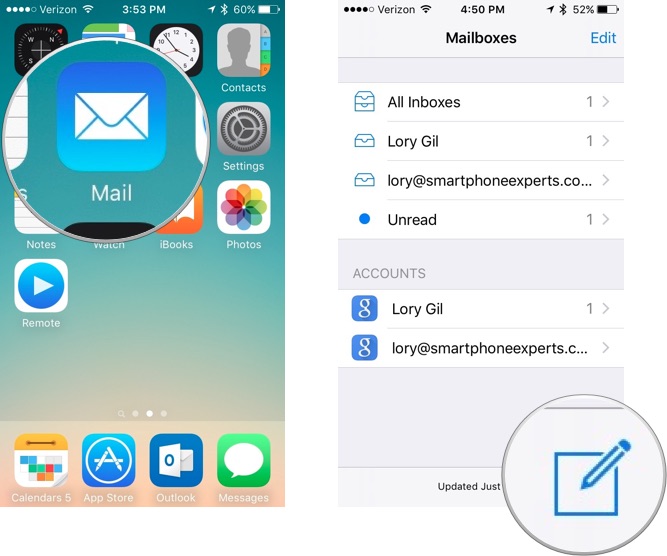
  1. Open the Mail app.
  2. Tap the Write mail icon in the bottom right corner of the screen.
    How to remove recent contacts in the Mail app for iPhone
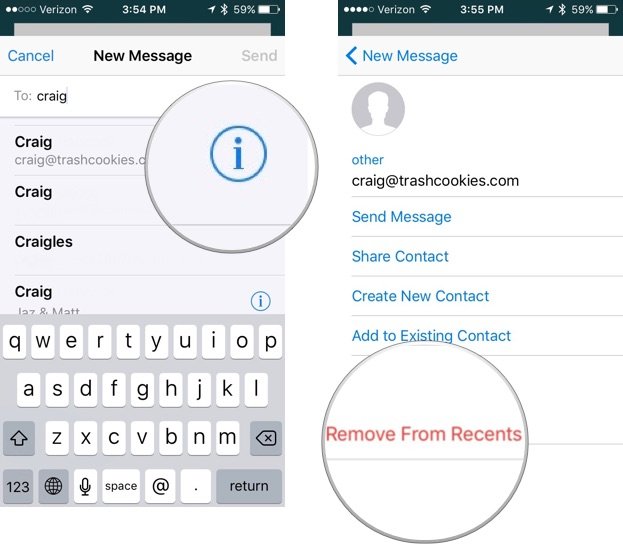
  3. Start typing a name.
  4. Find the old contact when the list of suggested emails appear.
  5. Tap the info icon next to the name.
  6. Tap Remove from Recents.
    How to remove recent contacts in the Mail app for iPhone
The contact will no longer appear as a suggested email in autofill in the Mail app.

How to update a contact with a new email address in the Mail app

If you've recently received a message from someone with a new email address, you can also quickly add it to your Contacts.
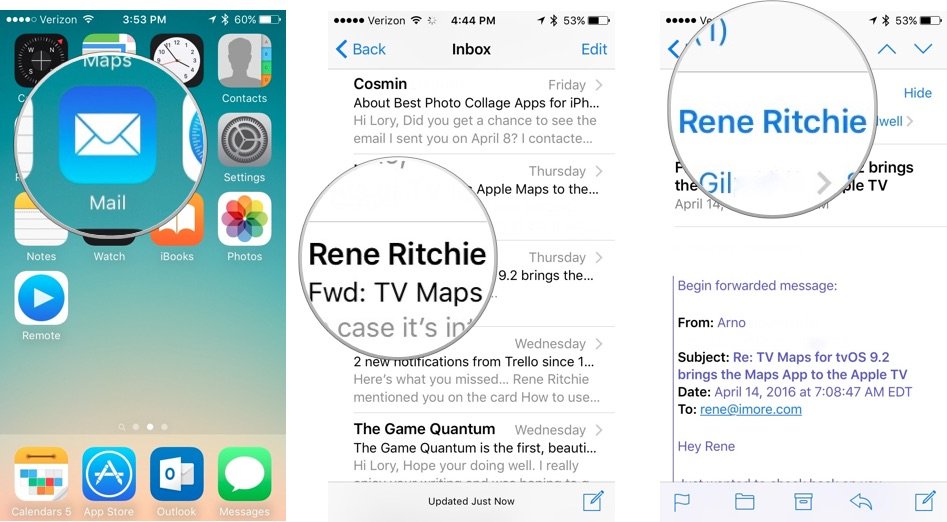
  1. Open the Mail app.
  2. Tap the email with the new contact.
  3. Tap the email address.
    How to remove recent contacts in the Mail app for iPhone
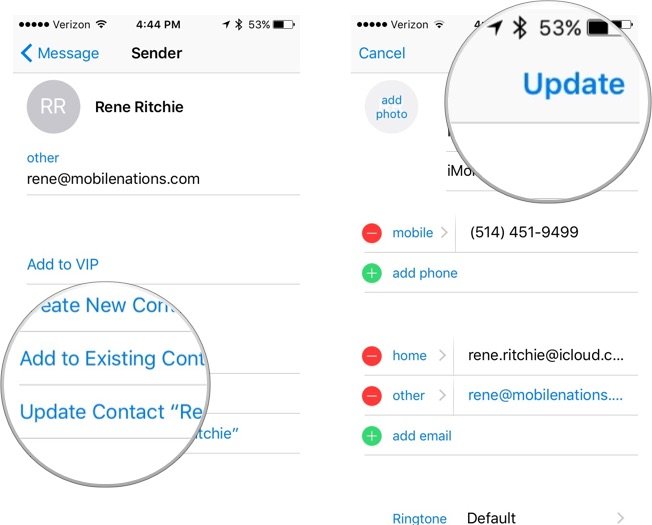
  4. Tap Add to existing contacts and select a contact.
  5. You can also tap Update Contact if it is labeled under the correct name.
  6. Tap Update in the upper right corner of the screen.
    How to remove recent contacts in the Mail app for iPhone
Once added, the new email address will show up as a suggested option in autofill in the Mail app.

Saturday, April 16, 2016

How to save offline maps with Google Maps for iPhone

How to save offline maps with Google Maps for iPhone
  • Of course you will need to have Google Maps installed on your device, so make free app in the App Store. Once you have that installed and ready to go, follow these steps:
    sure to grab the
    • Open the Google Maps app and search for an area or location you want to save
    • Once you have that area entered, tap on the menu icon (three horizontal lines) and choose Offline areas
    In Offline Areas tap on the plus (+) icon in the lower-right corne
  • Offline Areas - Icon
  • You can pinch and zoom around to get the exact area you want. There is a limit to how big you can go, and also know that the bigger map you save the more space it and time it will take to download.
  • Tap on Download, title your new offline map and tap Save. Your offline map will begin downloading to your device.
    Save Offline Map
That’s pretty much it. That location will be saved on your device for 30 days. After 30 days Google will delete it from your phone in an effort to save space. You can of course re-download the offline map at any time. There is also an update feature that you should try to use a much as possible. There is always construction and new buildings coming up in Los Angeles, so an updated map is extremely helpful.
Whenever you are offline or disable cellular data that map will be available for you to pinch and zoom like a digital map, and can still dictate driving directions. The driving direction is great for getting around an area without the need to be online at all (sans real-time traffic updating). It can come very handy while you’re travelling abroad and don’t want to use data to rack up crazy data roaming charges.

Offline Driving Directions

Of course, if you are offline there will be no traffic information detailed so walking, biking, and transit directions will all be unavailable.

No Internet - Google Maps

You can view and edit your offline maps by tapping the menu icon and selecting Offline areas. All of your saved offline maps will be listed in this section. When you tap on an area you can delete or update it. To view a workable version of the map just type in the location in the search function and the map will load when you are offline.

Delete:Update - Offline Maps

We hope Apple adds the offline maps feature to the Maps app in iOS 10.
How useful are offline maps to you? Let us know in the comment section.

Thursday, March 31, 2016

With SoundCloud Go, you get:

Introducing SoundCloud Go
With SoundCloud Go, you get:
It’s a big day for the SoundCloud community – for both creators and listeners, newbies and those of you who’ve been with us from the beginning.
We’re happy to announce that SoundCloud Go, our subscription service for listeners, is now available in the U.S.
SoundCloud Go is the same SoundCloud you’ve known for years taken to the next level: with an expanded catalog of tracks that are new to the platform, new features and new functionality.
• Even more tracks from emerging and established creators – including the massive hits, the latest tracks from the biggest names, the sounds of the underground, the most engaging podcasts and the best of what’s up-and-coming – all in one place
• The ability to listen offline on your mobile device without a cell signal or internet connection
• An uninterrupted, ad-free listening experience
Ready to get started? Sign up for a free 30-day trial of SoundCloud Go here or through the latest version of the app. After the first 30 days, it’s $9.99 per month (or $12.99 per month if purchased through our iOS app). You can cancel anytime.
Have questions? We’ve got a full breakdown of what this means for SoundCloud listeners and creators below. Or learn more here.
Listeners
For listeners, there are now two awesome ways to experience SoundCloud. SoundCloud will continue to be the place to listen to, discover and share new tracks from emerging and established artists for free. With SoundCloud Go, the experience has also been expanded to include access to even more tracks, offline and ad-free:
Meet the expanded catalog
Emerging artists, upstart indies and brand new artists – the same community that brought countless up-and-coming creators to the mainstream is still here. Now, on the heels of licensing agreements withUMG, Sony, Merlin, Warner and others, tons of additional tracks will also be available right alongside your favorite new artists and indies. With SoundCloud Go, the catalog now includes a slew of new tracks and albums from the biggest names in music.
Take SoundCloud offline
Want to take your tracks and playlists wherever you go? SoundCloud Go’s got you covered. You can now make your likes and any of your playlists available for offline listening.
Another offline option for serious listeners: SoundCloud Go enables you to make all of your current and future likes and playlists available for offline listening. Liked tracks and playlists will become available in real time. Any future tracks or playlists you like or create will automatically save as well.
Whether you’re down in the subway, 30-thousand feet overhead or completely off the grid, with SoundCloud Go, you’ll have access to all your favorites offline.
No more interruptions
Ads help us earn money for artists, but they can sometimes interrupt your listening experience. We know that some users may want to remove anything that disrupts the experience of listening, whether that’s an audio ad in-between tracks or a display ad. SoundCloud Go allows you to do just that: remove interruptive ads from your experience.
Creators
With the launch of SoundCloud Go, creators can now reach more listeners in more places, and do so in the most diverse content ecosystem in audio streaming. In other words? Your tracks are in good company. With our algorithm-fueled discovery features, your best work could be queued up after a chart-topping hit – and your next biggest fan could be one click away.
SoundCloud Go subscribers in the U.S. will also have the option to take your tracks offline – meaning they’ll have access to your tracks and their plays will boost your stats regardless of whether or not they have a cell signal.
And, never fear: the totally free SoundCloud you know and love will always be here. You’ll still be able to reach the platform’s 175 million unique monthly listeners, whether they’re SoundCloud Go subscribers or not.
We’re always working on new ways to open up the SoundCloud platform and monetization tools to more creators and audiences – and that hasn’t changed. Your tracks are yours. You’ll still have control over who has access to them and how.
Finally, if you’re a U.S.-based SoundCloud creator with a Pro Unlimited account, you’ll have access to SoundCloud Go at a discounted rate of $4.99 per month for the first six months of subscription time.Get SoundCloud Go >
Got more questions? Head over to our dedicated SoundCloud Go help section here or ask questions directly in our forum. We’re here to answer any questions you have about SoundCloud Go.
And, as always, stay tuned to our Facebook, Twitter and Instagram channels for the latest from SoundCloud.

Tuesday, March 8, 2016

GOOGLE HIRES FOUNDER OF 4CHAN, THE SITE THAT SPAWNED ANONYMOUS

GOOGLE HIRES FOUNDER OF 4CHAN, THE SITE THAT SPAWNED ANONYMOUS
Google has hired the founder of 4chan, the web forum notoriously credited as being the birthplace of the Anonymous hacking collective.
Chris Poole, known by his online moniker Moot, created 4chan in 2003 when he was 15 years old.
Originally an image-sharing hub for fans of Japanese anime, it has since grown into a sprawling messaging board that has garnered controversy for offensive and occasionally illegal content.
In 2014, hacked nude images of celebrities, including the actor Jennifer Lawrence, appeared on the site, following a breach to Apple’s iCloud service. Poole left the site in 2015, eventually selling it to a Japanese entrepreneur. The site continues to attract 22 million monthly visitors.
“When meeting with current and former Googlers, I continually find myself drawn to their intelligence, passion, and enthusiasm—as well as a universal desire to share it with others,” Poole said in post on Tumblr. “I’m also impressed by Google’s commitment to enabling these same talented people to tackle some of the world’s most interesting and important problems.
“I can’t wait to contribute my own experience from a dozen years of building online communities, and to begin the next chapter of my career at such an incredible company.”
Bradley Horowitz, Google’s vice president of streams, photos and sharing, welcomed Poole to the tech giant in a post on his Google+ page. “I’m thrilled he’s joining our team here at Google,” Horowitz said.
It has been speculated that Poole’s experience will be used by Google to boost its social media platforms, including its flagging Google+ social network.

Tuesday, January 12, 2016

Internet Explorer is dead

Internet Explorer is dead
Internet Explorer, which was first called Windows Internet Explorer, was first released as part of the add-on package Plus! for Windows 95 in 1995.
Internet Explorer was one of the most widely used web browsers, attaining a peak of about 95 per cent during 2002 and 2003.
However, it struggled in the face of competition, and in May 2012 it was announced that Google's Chrome overtook Internet Explorer as the most used browser worldwide.
The brand has struggled to shake off the bad reputation of Internet Explorer 6, which was notoriously insecure.
After Internet Explorer 6 was released in 2001, the browser hit its first real speed bump in its digital life.
An alert from the United States Computer Emergency Readiness Team warned users in 2004 that holes in Internet Explorer could lead to their passwords and other personal information falling into the hands of hackers.
Microsoft rolled out a fix but security issues continued to grow - causing the firm to eventually decide to kill off the brand.

Tuesday, December 15, 2015

Highlight the posts that matter the most

Highlight the posts that matter the most
As bloggers, we all know how important it is to post frequently in order to encourage readers to come back. Of course, the more you post, the more quickly your posts slip down into the archives, making it harder for your readers to discover everything you’ve posted that they might be interested in.
To help make it easier to showcase the posts you want your readers to see, we’ve created a new gadget called Featured Post. With Featured Post, you can choose posts you’ve shared on your blog and highlight them wherever you’d like.
Whether you’d like to re-share that delicious holiday recipe from a few years back, spotlight a can’t-miss promotion you’re running, or just revive something quirky from the archives, the Featured Post gadget is a simple way to show off the content that matters most.
To try it, just head to your Layout tab, add a gadget, and select ‘Featured Post’. You’ll be able to place the gadget wherever you’d like on your blog and then choose the post you’d like to show. If you’d like to highlight something new, you can change the post you feature at any time.
Happy blogging!
Posted by Guy Ronen, Product Manager

Saturday, December 5, 2015

Google is making it easier for more games to come to Chromecast


Tuesday, October 20, 2015

Behind the red warning: more info about online site safety

Behind the red warning: more info about online site safety
[Cross-posted on the Google Online Security blog]
You’re browsing the web, checking out the latest news on your favorite band, when suddenly you see a red warning screen: “The site ahead contains malware.” These warnings aren’t new—since 2006, Google Safe Browsing has shown them when you navigate to an unsafe site. The warnings protect you from harms caused by unsafe sites, such as malware infections and phishing attacks. But it hasn’t always been clear why a specific website triggers a warning, and you may want to learn more.
To demystify these warnings, we’re launching a Site Status section in the Transparency Report. The next time you come across a Safe Browsing warning, you can search for the blocked website in the Transparency Report to learn why it’s been flagged by our systems.
The new Site Status section of the Transparency Report replaces our previous Safe Browsing diagnostic page. It includes a clearer interface and simpler explanations of the issues, such as details for sites that host unwanted software. We’ve added it to the Transparency Report so that the Safe Browsing section of the report is a one-stop shop for information to help you understand what Safe Browsing is and how it works.
If a favorite website shows up as “dangerous,” it’s often due to user-uploaded bad content or a temporary malware infection. The Site Status will return to normal once the webmaster has cleaned up the website. To help speed up this process, we automatically give the webmaster a heads-up about the problem via Search Console; if you useGoogle Analytics, we’ll also warn you there if your site has malware on it. (Webmasters, check the help center to learn how to remove malware from your websites.)
We’re constantly working to keep users safe and informed online. Visit the updated Site Status section in theTransparency Report to experience it yourself.
Posted by:
Adrienne Porter Felt, Chrome Security Engineer and Warning Wizard
Emily Schechter, Safe Browsing Program Manager and Menace to Malware
Ke Wang, Safe Browsing Engineer and Developer of Defense

Wednesday, October 7, 2015

Affiliate Marketing and Blogging

Affiliate marketing is one way in which bloggers utilize their blog to generate revenue. The amount of revenue generated by a blog featuring affiliate marketing links may vary significantly depending on the amount of traffic the blog receives as well as the compensation offered for the affiliate marketing. Affiliate marketing essentially entails creating a link on the blog to another company’s website. 
The other company then compensates the blog owner according to a previously agreed upon contract. 

This compensation may be awarded in a number of different ways. The blog owner may be compensated each time the advertisement is served, each time a unique website visitor clicks through the advertisement or each time a blog visitor performs a desired action such as making a purchase or registering with the website. 
This article will discuss some aspects of affiliate marketing which bloggers should understand including selecting opportunities carefully, maximizing the income potential for these opportunities and understanding the requirements associated with these affiliate marketing opportunities.
Selecting Affiliate Marketing Opportunities
There is a wide variety of affiliate marketing opportunities available. Many different companies and websites offer affiliate marketing opportunities.
 In most cases the blog owner simply needs to submit the website address of his blog along with some other basic information for approval. In most cases the company is not likely to reject the application unless the content of the website is deemed to be objectionable or otherwise in conflict of interest with the company’s goals. 
However, although getting approved to display affiliate links on your website is a rather simple process, this does not mean blog owners should select these affiliate marketing opportunities without discretion. It is a far better idea to carefully select affiliate marketing opportunities with companies who are of interest to the target audience of the blog.
A well focused blog that is reaching a specific target audience should seek to display marketing links directing website traffic to companies which complement the blog without acting as direct competition to the blog.
 This helps to ensure the blog visitors will not only be interested in the affiliate marketing links and therefore more likely to click on the links but will also help to ensure the blog visitors do not find the affiliate marketing links to be bothersome.
Maximizing Affiliate Marketing Opportunities
Once blog owners have selected affiliate marketing opportunities it is time to consider how they can maximize the profit generated by these links. There are a couple of critical factors which blog owners should carefully consider to help maximize their profit from affiliate marketing. 
This includes regularly evaluating the effectiveness of the affiliate links and promoting the blog to maximize traffic.
Blog owners who incorporate affiliate marketing into their blog should regularly evaluate the effectiveness of the affiliate links. This can be done by comparing the percentage of blog visitors who click on the affiliate links to the overall blog traffic.
 A blog which has high traffic but a relatively small percentage of visitors who click on the affiliate links should consider making changes to attempt to entice more blog visitors to click on the links. These changes can involve the aesthetics, size or location of the advertisements. Making only one change at a time is recommended because it makes it easier for the blog owner to evaluate which changes are most beneficial.
Blog owners can also help to maximize the profit from their affiliate marketing opportunities by doing self promotion to drive additional website to the blog. This will likely be beneficial because higher website traffic will generally translate to greater profit from affiliate marketing. Additionally, the blog owner may want to occasionally mention companies for which they are an affiliate to generate interest in the advertisements on the website.
Understanding Affiliate Marketing Requirements
Finally, blog owners should pay careful attention to the affiliate marketing agreements they enter. This is important because some companies may place restrictions on the usage of a link to their website. This may include restrictions such as avoiding objectionable content, not including links or advertisements for direct competitors or restrictions on the appearance of the affiliate links.
 Failure to adhere to these guidelines may result in the blog losing affiliate privileges and the blog owner being denied compensation.

Wednesday, September 16, 2015

SEO and profit from Google AdSense

If you've been using Google's AdSense on your pages you obviously feel the need to somehow generate even more traffic for your website, which in turn would translate to more AdSense click and a higher income.
But who do you do this? Well, the major way you'll get visitors to see your website (other then using AdWords, which is encouraged as well) is to use some techniques to have search engines send more and more users towards your page, by ranking high in search results for your topics of interest.
Believe it or not this is a technique, better known as search-engine optimization or simply SEO. So here are a bunch of tips that come handy under every amateur or professional optimizer's belt.
The first thing you need to take care of is the actual source code and layout of your page. This has to be kept as simple as possible. The problem comes when AdSense and the search engines themselves begin to have troubles in extracting the most relevant keywords on your site because of a too complex layout.
Secondly, try to have each one of your pages target only one specific topic. This way it is a lot easier for them to get indexed properly and for the AdSense ads to be consistent with the content of the site itself.
Also, try not to include too many hyperlinks in your page as well. This also means you should try not to use too many AdSense ads on your page either.
If there are certain keywords you wish to target, make sure the word you wish to target is present in the title, in the first paragraphs as well as in the name of the file. While you're at it you might want to ensure the word springs up in the page's last paragraphs.
And of course, it's very important for your content to have original and compelling content. How do you do this? Well the easiest way to do it is to find something you're really passionate about. That way, providing you give it a lot of effort you're bound to have a great page quite fast.
If the content you use in your site is in the public domain (which is highly discouraged) make sure that you at least give it an original title, and add an opening and a closing paragraph of your own.
This takes a little while, but if, after waiting, you still can't find your page near the top, you should try rewriting your title and your first and last paragraphs. It doesn't take much, often just changing a few words will give you the right results.
And of, course there's the use of keyword tools that may aid you in finding some good keywords to include on your page that will drive visitors to your site more and more.
So those are about the basic techniques in search engine optimization. You can find a lot of computer tools to aid you in doing this, and of course, Google is a great place to search for this.
In the end, you'll find that SEO is a complex topic, and entire books have been written on the topic as well. You might find that you have a lot of optimization you need to do in order to get more and more visitors to your site and clicking those precious AdSense banners.

Thursday, September 3, 2015

Find Out What Your Audience Is Looking For

Keyword Tool Is The Best Alternative To Google Keyword
Planner And Ubersuggest
Here are a few reasons why:
It generates up to 750+ suggestions for every keyword
No errors. Keyword Tool is extremely reliable as it works 99.99% of the time
It's free
Are you a business owner, online marketer or content creator? You would definitely need to grab people's attention in order to make them click on your ads or even read your content. For that, you will have to first understand what your potential customers or readers are actually searching for.
Every search is an expression of people's needs, wants, interests and desires. Imagine how your business would benefit if you could analyse these search terms that are related to your business domain and customise your product to serve the actual needs of your customers.
Keyword Tool will help you discover thousands of the new longtail keywords related to the topic that you specify by automatically generating Google's auto suggestions. The auto suggestions will be generated based on the Google domain and language that you choose.
How Does Keyword Tool Work?
Keyword Tool is free online keyword research instrument that uses Google Autocomplete to generate hundreds of relevant long-tail keywords.
Google Autocomplete is a feature used in Google Search. Its purpose is to speed up the searches performed by users on Google.
The search terms that are suggested by Google Autocomplete are based on a number of different factors, one of them is how often users were searching for a particular term in the past.
Keyword Tool helps you use Google Autocomplete for keyword research. It extracts Google suggestions and presents it to you in a convenient form.
To generate long-tail keyword suggestions, Keyword Tool prepends and appends the term, that you specify with different letters and numbers. It also allows you to choose a specific Google domain (192 Google domains supported) and language (83 languages available) combination.
Keyword Tool generates over 750+ keywords in the language of your choice. You can export the keywords and use them for content creation, search engine optimization, PPC or other marketing activities.
Why Keyword Tool Is One Of The Best Free Keyword Research Tools?
There are few places where you can find keywords that people type in Google search box. One of the most popular sources of this information is Google Keyword Planner.
Unfortunately data presented by Google Keyword Planner is meant to be used for paid advertising inside Google Adwords platform. The keywords that you will find there might be too general and not very descriptive.
On another hand, the Google Autocomplete feature that is used by Keyword Tool is meant to facilitate the search process.
It's in Google's best interest to show users the most relevant keywords. Keywords that would help Google to retrieve the most relevant websites and help users find the most relevant content for their search query.
Autocomplete predictions are automatically generated by an algorithm without any human involvement based on a number of objective factors, including how often past users have searched for a term.
Keyword Tool Helps To Find Keywords That Are Hidden In Google Keyword Planner
Did you notice that you are unable to use Keyword Planner without an AdWords account?
There is a reason for that. Keyword Planner - is a tool created for advertisers and is not meant for SEO. Yes, it does contain valuable data such as competition, suggested bid, average monthly searches etc.
But, at the same time it will hide lucrative long-tail keywords with thousands of monthly searches that can be used to create content for your website. Some digital marketing professionals think that it is done on purpose and helps Google to increase the competition and cost per click for a limited number of keywords.
Keyword Tool is the best alternative to Google Keyword Planner for SEO as it doesn't hide popular keywords that can be used to create content for your website.
Keyword Tool For SEO And Content Creation
If you want your website to get traffic from Google or other search engines, you need to make sure that your website contains content created around the right keywords. What this means is that you should be using words that your potential audience is already using while looking for similar products or services online.
The best way to discover these keywords, as it was proven by thousands of thriving online businesses, is to use Google's auto suggested keywords as a base to create content for your website.
By creating content around these popular keywords you are readily giving great value to your website visitors, in return Google will reward your website with higher rankings which entails traffic increase.
Keyword Tool For International SEO
If you are looking for keywords in languages other than English, you will find Keyword Tool's features really useful. It allows you to select from 192 Google domains and 83 Google language interfaces to generate keyword suggestions. The generated keywords will be relevant to the country that you are creating your content for.
Keyword Tool For Advertising
If you are running Pay-Per-Click (PPC) advertising campaigns and target your ads based on keywords that users type in Google, you know how important it is to select the right keywords.
The relevant keywords that you target will bring the right audience to your website. Showing your ads to people that type relevant keywords would result in higher Click-Through-Rate (CTR), lower Cost-Per-Click (CPC) and higher conversion rates for your business. As a result, you will spend less money on advertising and generate a better return on investment

Tuesday, July 21, 2015

3 Steps to Optimize Article Titles for More Traffic

SEO (Search Engine Optimization) is an important process that I do for my blogs every day to
make them getting better ranking on search engines. Not saying off-page SEO techniques, in this article, I want to talk about some on-page SEO tips, that are usually mentioned by any web-master and blogger in basic SEO Guide, they are called: post title SEO tips.
At beginning, my blog has many quality and important articles, but I realized that has only some entries getting plenty of views and others not getting good traffic like that. If you also met that case, my tips in this post are for you to find out what is the thing that's the leading causes for low rankings on search engines of your great articles.

Optimize Article Title Examples

So, if we want to resolve this situation, the first thing we should think about now is that how to write a good article title which can bring back a lot of traffic by occupying good rankings on search engines (for relevant search queries). If you can not imagine why an optimized article title can affect to views for your site, just trying to visualize two following examples:
  1. Install Wordpress Site Tips
  2. Install Wordpress Tips for Beginners in Detail
If it was you, what's the post title that you will click? Actually your choice is not important, the importance is the 2nd title carries many focus keywords for the newbie as "detailed guidance", "beginners" and that is what a person who is learning how to install WordPress needs. Thereby, search engines will also prioritize showing your result on the first page because its detail in the article title.
OK, now I think you already understand about the importance of an optimized article title. If you are interested, please continue with my "tips" to know how to optimize article titles as below.

3 Steps to Optimize Article Titles for More Traffic

Before starting with my tips to write search engine friendly title, we need to set some mandatory requirements as follows:
  • The title must relate closely to the content
  • The title is no longer than 70 characters because the search results display only the first 70 characters in the title
  • The title must have at least one keyword or important keyword phrase in the article content
  • Only write title after finishing the article content

Step 1. Analyze Main Keyword

Keyword analysis is a very important step that you need to do first when starting title optimization. This step helps you identify important keywords which is being searched by many people to input it into your title.
Currently there are many keyword analysis tools, but I like Google's Keyword Planner most (you must have Google Adwords account first) because it's free and professional. If you do not know how to use it, let me explain how to use this tool to analyze and find optimized keywords to set to title.
Assuming we are preparing to write an article about "how to create a blog" and we use this tool to find relevant keywords which are being sought by a lot of people to use in our title. At first, we will access to Google Adwords homepage and choose Keyword Planner.